Subscription Billing Checklist for SaaS Apps
Struggling with subscription billing for your SaaS business? Here’s a quick guide to get it right.
Subscription billing is more than just recurring payments. It ensures smooth customer experiences, minimizes churn, and supports scalable growth. But without the right approach, errors can lead to revenue loss and unhappy customers.
Here’s what you need to know:
- Choose the right billing model: Flat-rate, tiered, usage-based, or hybrid - align pricing with how customers perceive value.
- Use automated tools: Smart retries, card updaters, and proration ensure accurate charges and reduce involuntary churn.
- Segment customers: Tailor workflows based on business size, geography, and preferences for better retention and revenue.
- Set up a self-service portal: Let customers manage subscriptions, update payment details, and access invoices without hassle.
- Test and monitor: Validate billing processes in sandbox environments and track key metrics post-launch to resolve issues quickly.
- Leverage AI tools: Platforms like ClackyAI simplify setup, automate workflows, and improve billing accuracy.
Fact: Businesses using subscription models grew revenue nearly 5x faster than S&P 500 companies (2012-2022). Automating billing can save 60+ hours monthly and cut churn by 20-30%.
Ready to streamline your billing process? Let’s dive into the details.
Defining Billing Models and Customer Segmentation
Choosing Your Billing Model
Selecting the right billing model is crucial for determining how you charge customers and predict revenue. One option is flat-rate pricing, where customers pay a fixed fee for all features. While simple, this approach can lack the flexibility to cater to diverse customer needs [8][9]. Another approach is tiered pricing, which offers multiple packages - think Basic, Pro, and Enterprise. This method allows you to address a range of budgets and requirements simultaneously [9][12]. Alternatively, usage-based pricing charges customers based on their consumption, like the number of API calls or storage used. This model naturally scales with customer growth but can lead to unpredictable revenue and unexpected bills for users [10][12].
Many SaaS businesses combine these models - for instance, charging a base fee alongside usage-based surcharges [10]. The trick lies in aligning your pricing with how customers perceive value. A great example is Slack, which partnered with Stripe in 2021 to roll out a custom usage-based invoicing system across 15 countries. This system allowed customers to adjust their plans independently while also cutting down on engineering maintenance time [11].
"Having a billing system that lets you stay nimble to respond to customers' needs is really critical" [11].
When setting up your billing model, don’t overlook proration. This ensures accurate charges when customers make mid-cycle plan changes, which helps maintain trust and avoids disputes [11].
Once your pricing strategy is in place, the next step is to segment your customers for tailored billing workflows.
Segmenting Customers by Type
Customer segmentation is all about grouping users based on shared characteristics to enhance billing workflows and maximize revenue. One common method is segmenting by business size. For example, startups often prefer low-friction, self-service tiered pricing, while enterprises are more likely to require custom contracts and tailored billing schedules [9][11]. Geography is another important factor, as tax laws, popular payment methods, and currency preferences vary by region [13].
Segmentation can also help reduce churn. By analyzing user data, you can identify at-risk customers and offer targeted discounts. For instance, 49% of subscribers are more likely to stay if they’re presented with a discount during the cancellation process [13]. Additionally, offering localized payment options - like ACH for U.S.-based businesses or SEPA for European customers - can boost conversion rates by as much as 50% [11]. Twilio demonstrated the power of segmentation by running A/B tests with global payment processors, which led to a 10% improvement in authorization rates [11].
Automating Billing for SaaS
Setting Up Payment Infrastructure
Payment Processor Comparison for SaaS Subscription Billing
Evaluating Payment Processors
Choosing the right payment processor is key to streamlining your billing operations and recovering failed payments effectively. Start by ensuring the processor supports a variety of payment methods. This includes major credit and debit cards, digital wallets like Apple Pay and Google Pay, and bank transfers such as ACH for U.S. customers or SEPA for those in Europe [16][18]. To protect sensitive data, confirm that the processor complies with PCI DSS standards and uses tokenization to avoid storing raw card details [15][16].
Look for features that help recover revenue and reduce churn. For instance, Stripe offers smart retries and dunning tools, which can recover around 57% of failed recurring payments [18]. Some processors also provide card account updater services to automatically refresh expired card details - a must-have for subscription businesses [15][2][18]. Additionally, ensure the processor supports global operations with multi-currency processing, local acquiring, and automated tax calculations [15][17].
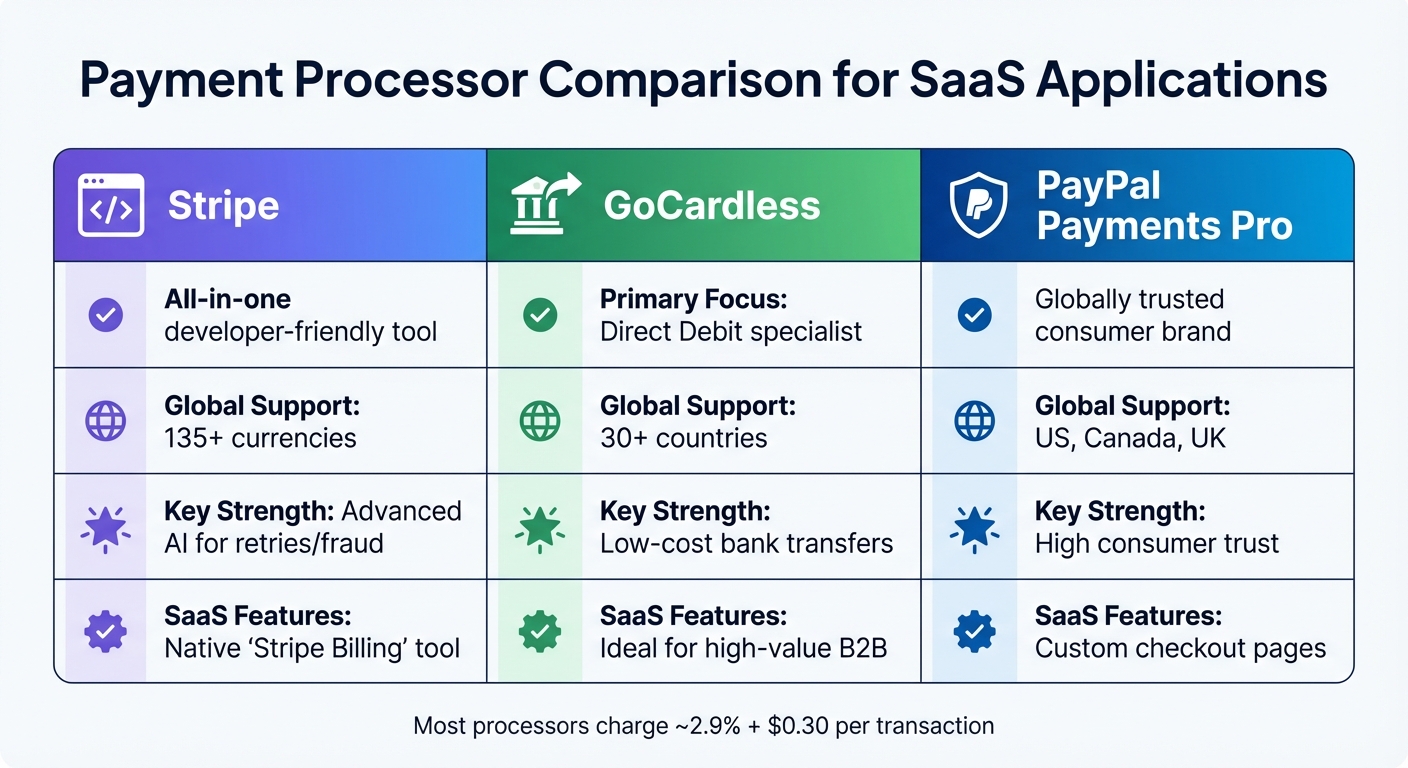
Here's a quick comparison of three popular payment processors for SaaS applications:
| Feature | Stripe | GoCardless | PayPal Payments Pro |
|---|---|---|---|
| Primary Focus | All-in-one developer-friendly tool | Direct Debit specialist | Globally trusted consumer brand |
| Global Support | 135+ currencies [18] | 30+ countries [15] | US, Canada, UK [15] |
| Key Strength | Advanced AI for retries/fraud [2] | Low-cost bank transfers [15] | High consumer trust [15] |
| SaaS Features | Native "Stripe Billing" tool [2] | Ideal for high-value B2B [18] | Custom checkout pages [15] |
Be mindful of transaction fees. Most processors charge around 2.9% plus $0.30 per transaction, but additional fees - like setup costs, chargeback fees, or currency conversion charges - might apply [16]. Before launching, thoroughly test your setup in a sandbox environment. This includes simulating edge cases like failed payments or subscription upgrades mid-cycle [15][17].
Once you've selected and set up your processor, the next step is defining billing cycles and invoicing rules.
Configuring Billing and Invoicing Rules
Now that you've chosen your payment processor, it's time to configure billing cycles and invoicing rules. Start by aligning billing cycles with your revenue model. Monthly billing ensures steady cash flow, while annual billing can boost retention and provide upfront working capital. For customers switching plans mid-cycle, set up proration logic to calculate cost differences automatically - this promotes fairness and builds trust [2][7].
For U.S. customers, use familiar formats for currency ($1,234.56) and dates (MM/DD/YYYY). European customers may require VAT to be displayed on invoices, as mandated by local laws. Tools like Stripe Tax can simplify sales tax calculations across all U.S. states and over 100 countries [3].
Regional authentication rules also come into play. For European transactions, implement Strong Customer Authentication (SCA) to comply with PSD2 regulations, using 3D Secure protocols [3][2]. In India, the Reserve Bank mandates pre-debit notifications for recurring payments [3]. To guard against fraud, validate webhook signatures to ensure that payment notifications are legitimate and not tampered with [5][6].
"In Europe, invoice requirements vary from country to country. Stripe invoice templates make it easy to follow invoicing best practices in the region." [3]
Finally, integrate your payment processor with accounting software to automate reconciliation tasks [18]. These configurations ensure compliance with international regulations while maintaining smooth, automated processes.
Automation and Customer Experience
Automating Payment Processes
Streamlining payment processes can save time and reduce errors. Start by defining your pricing model - whether it’s flat-rate, per-seat, tiered, or usage-based - so the system can calculate charges automatically and securely store customer payment tokens.
Set up the system to generate invoices automatically for each billing cycle and adjust subscription statuses based on payment outcomes. For instance, a subscription can transition from trialing to active after the first successful payment or to past_due if the payment fails. Use webhooks like invoice.paid and invoice.payment_failed to trigger automated workflows for access management and revenue recovery.
AI-powered solutions, such as Smart Retries, can make a big difference in recovering failed payments. These tools can boost recovery rates by up to 9%, contributing to an average recovery rate of 56% for failed payments. In fact, Stripe's automated recovery features helped businesses recover over $6.5 billion in 2024 alone [19].
"Scaling our products means giving our users flexible subscription options. With Stripe Billing, we quickly rolled out monthly pay-as-you-go options for ChatGPT and our API, respectively."
Enable automatic proration to handle mid-cycle changes like upgrades or downgrades. This ensures that credits are adjusted without manual effort. Additionally, use test clocks to simulate billing cycles and payment scenarios, helping you identify and address potential issues before they impact customers.
Building a Customer Portal
After automating payments, take the next step by offering a self-service billing portal. This empowers customers to manage their subscriptions independently, which reduces support requests and enhances their experience. Through the portal, users can update payment methods, modify billing details, add tax IDs, and switch plans - all without needing assistance. The system also handles proration calculations seamlessly and provides access to billing history and downloadable invoices.
To minimize churn, integrate cancellation deflection features into the portal. By customizing the portal with your branding, such as logos and colors, you can create a cohesive and professional experience. For added security, use short-lived sessions, and consider automatically adjusting the portal’s language and currency settings based on the customer’s browser preferences.
"With billing, tax, reporting, and more on the same platform, Stripe automation helps eliminate inefficient processes as we scale the business."
A self-service portal can also help you comply with regulations in areas that require simple, two-click subscription cancellations.
Setting Up Notifications
Automation and self-service are even more effective when paired with timely customer notifications. Keep customers informed by sending receipts immediately after successful payments and alerts for failed transactions. For trial users, notify them three days before their trial ends using the customer.subscription.trial_will_end event.
Proactive reminders can prevent service interruptions. For example, notify customers a few weeks before their credit cards expire, giving them time to update their payment details. Use the invoice.upcoming event to alert customers about upcoming renewal charges. If a payment requires 3D Secure authentication, monitor the invoice.payment_action_required event and notify customers promptly to ensure smooth payment completion.
Automated dunning emails, combined with Smart Retries, allow the system to retry failed payments at optimal times while keeping customers in the loop. For high-value payment failures or overdue invoices, set up internal alerts so your team can follow up manually when necessary.
"When customers are well-informed, they feel valued and respected. Keeping them updated reduces confusion, minimizes disputes, and fosters a positive perception of the brand."
- Stripe [14]
Personalize notifications with your company’s branding to reinforce your identity. For cancellation confirmations, consider including a survey link to gather feedback on why customers are leaving. This can provide valuable insights for improving your services.
sbb-itb-c336128
Testing, Validation, and Monitoring
Testing and Validating Billing Processes
Before launching your billing system, it's critical to test every possible scenario to avoid expensive errors. A key first step is replacing all test API keys with production keys - using test keys in a live environment can lead to app crashes [20]. Conduct end-to-end purchase tests in sandbox environments like Apple Sandbox or Google's testing tools to simulate real-world conditions [20].
Leverage test clocks to speed up time-sensitive testing, such as annual subscriptions, trial expirations, or mid-cycle changes [4][21][23]. Use test card numbers designed to simulate various situations, including payment declines, 3D Secure authentication, and insufficient funds. This allows you to validate retry mechanisms and customer notifications [4][24].
Verify that all key webhook events are properly routed to the correct user accounts. Your server should handle events like invoice.paid, customer.subscription.deleted, and invoice.payment_failed accurately [20][4]. Test the "restore purchases" functionality by uninstalling and reinstalling your app to confirm users can regain access to active subscriptions [20]. Also, ensure that premium content is immediately available after successful payments and that access is revoked when subscriptions expire [20].
| Testing Component | Key Webhook Events to Monitor |
|---|---|
| Customer Sign-up | customer.created, customer.subscription.created |
| Invoicing | invoice.created, invoice.paid, invoice.payment_failed |
| Subscription Management | customer.subscription.updated, customer.subscription.deleted |
| Trial Periods | customer.subscription.trial_will_end, invoice.created |
| Payment Failures | invoice.payment_failed, invoice.payment_action_required |
Thorough testing ensures your billing system runs smoothly, safeguarding both revenue and customer trust. Once testing is complete, move to a phased rollout to gather feedback in real-world conditions.
Phased Rollout and Monitoring
After validating your billing system, the next step is a controlled rollout followed by continuous monitoring. Start by releasing the system to a small group of users before expanding to your full audience [20]. For iOS apps, wait roughly 24 hours after your app is marked "Cleared for Sale" to ensure new products are fully available on the App Store [20].
With automated alerts and retries in place, real-time monitoring becomes crucial to quickly identify and resolve any issues. Keep a close eye on critical webhook events post-launch. For instance, monitor invoice.payment_failed and invoice.finalization_failed to catch payment issues or tax calculation errors [25]. Track invoice.payment_action_required for transactions needing manual attention [1]. Logging all API requests and webhook events is an essential safeguard, especially if your payment processor's dashboard becomes inaccessible [22].
Regularly review subscription statuses, such as active, past_due, unpaid, or incomplete, to spot potential collection problems [1][25]. Ensure your webhook endpoint can handle delayed or duplicate notifications without depending on a specific event sequence [22]. Finally, differentiate between user-facing errors, like card declines, and backend issues so you can direct these problems appropriately to Customer Support or Engineering [22].
Using AI Tools for Subscription Billing
How ClackyAI Can Simplify Billing Setup
AI coding tools are changing the way development teams approach subscription billing systems. By offering pre-built API snippets and automating configurations, these tools help speed up deployment, a game-changer for startups and smaller teams without dedicated billing engineers [29].
ClackyAI has emerged as a standout option in this space. As a full-stack AI coding agent, it provides features like codebase-aware diagnostics, automated workflows for turning issues into pull requests, and seamless integration with payment processors and webhook handlers. These capabilities not only make the setup process faster but also improve billing accuracy. Plus, ClackyAI supports multiple frameworks, so teams can implement even the most complex billing workflows without juggling multiple tools.
AI platforms are capable of automating up to 95% of the billing process [27]. With natural language interfaces, teams can quickly create pricing plans, add-ons, and subscription settings in just seconds [29]. Some tools even go a step further by extracting contract details from PDFs or DocuSign files. This means billing terms, pricing tiers, and renewal dates are captured automatically, reducing the risk of manual errors that could lead to revenue losses [27]. These automation features save both time and money.
On average, companies using AI-driven billing automation save more than 60 hours each month on manual tasks [27]. Advanced dunning systems, powered by machine learning, optimize payment retries to cut involuntary churn by 20-30% [27][28]. Steve Wellman, Senior Director of Billing & Payments at Lucid Software, summed up the value of such tools:
"With one partner, I can manage payments, subscriptions, invoicing, renewals, and dunning" [29].
For teams managing subscription billing, AI tools also provide real-time usage rating, which is crucial for handling large amounts of data in consumption-based pricing models [26]. As consumer trust in AI grows, with 43% of people now comfortable letting AI manage their subscriptions for tasks like fraud prevention and payment recovery [29], the demand for these tools will only increase. By using AI coding agents like ClackyAI alongside specialized billing platforms, teams can launch production-ready subscription systems in a fraction of the time it once took.
Conclusion
This checklist brings together all the key components of an effective subscription billing system - from selecting the right pricing model to automating payments - ensuring your SaaS business remains flexible and competitive. Breaking the process into manageable steps makes building a subscription billing system much more achievable. Start by choosing the billing model that best fits your product’s value - whether it’s fixed, usage-based, tiered, or a hybrid approach [2]. Next, integrate a compliant payment processor like Stripe, set up automated invoicing and dunning workflows, and provide a self-service customer portal. These features not only streamline operations but also enhance user satisfaction while reducing support demands [5][11].
The numbers speak for themselves: subscription-based businesses grew their revenues nearly five times faster than S&P 500 companies from 2012 to 2022 [2]. Automated billing can save over 60 hours per month and cut involuntary churn by 20–30% through smart retry logic [27]. With the SaaS market projected to reach $374.50 billion by 2028, growing at an annual rate of 7.33% [31], a scalable billing system is no longer optional - it’s a necessity for staying ahead.
Once your system is live, keep a close eye on key metrics like authorization rates and dunning performance. Industry leaders emphasize the importance of this:
"The SaaS billing process is a strategic function that directly impacts cash flow, customer retention, and long-term growth" [30].
Incorporating AI tools can also take your billing strategy to the next level. Whether it’s for troubleshooting or speeding up deployment, AI solutions bolster your ability to experiment with pricing models and scale easily as your customer base grows. Tools like ClackyAI (https://clacky.ai) can simplify the process, allowing you to build a system that not only supports predictable revenue but also strengthens customer trust and satisfaction.
FAQs
How can AI tools like ClackyAI improve subscription billing for SaaS apps?
AI tools like ClackyAI can transform how subscription billing operates by automating time-consuming tasks such as creating invoices, retrying failed payments, and managing subscription updates. This not only cuts down on manual work but also reduces the chances of errors, making operations smoother as your business grows.
Beyond automation, AI brings a personal touch to customer interactions. It can predict churn, tailor renewal strategies, and address cancellations proactively - key elements for keeping subscribers engaged in SaaS businesses. By simplifying processes and ensuring precision, tools like ClackyAI help businesses scale effectively while staying compliant and secure.
How does customer segmentation help reduce churn in SaaS businesses?
Customer segmentation is a game-changer for SaaS businesses aiming to keep churn rates low. By breaking down your subscriber base into distinct groups - like new users, power users, or those who might cancel - you can focus on what each group truly needs. This means you can customize your communication, features, and support to meet their specific demands.
When you engage with customers in a way that matches their behavior and preferences, you’re not just offering a product - you’re building a connection. This creates stronger relationships, boosts loyalty, and reduces the chances of them leaving. Making your users feel understood and valued is the secret sauce for keeping them around for the long haul.
Why is selecting the right billing model critical for my SaaS app?
Choosing the right billing model for your SaaS app is a big deal - it affects your revenue, keeps customers happy, and makes your operations run smoother. When your pricing matches what your customers expect and need, it sets the stage for meeting your business goals.
A thoughtful billing model can also make life easier by simplifying things like tracking revenue and managing subscriptions. This, in turn, helps you grow more efficiently. By taking the time to understand your audience, your product, and your long-term strategy, you can pick a billing model that boosts customer loyalty and supports steady growth.